The App Question: Where Fishin' Frenzy Actually Lives
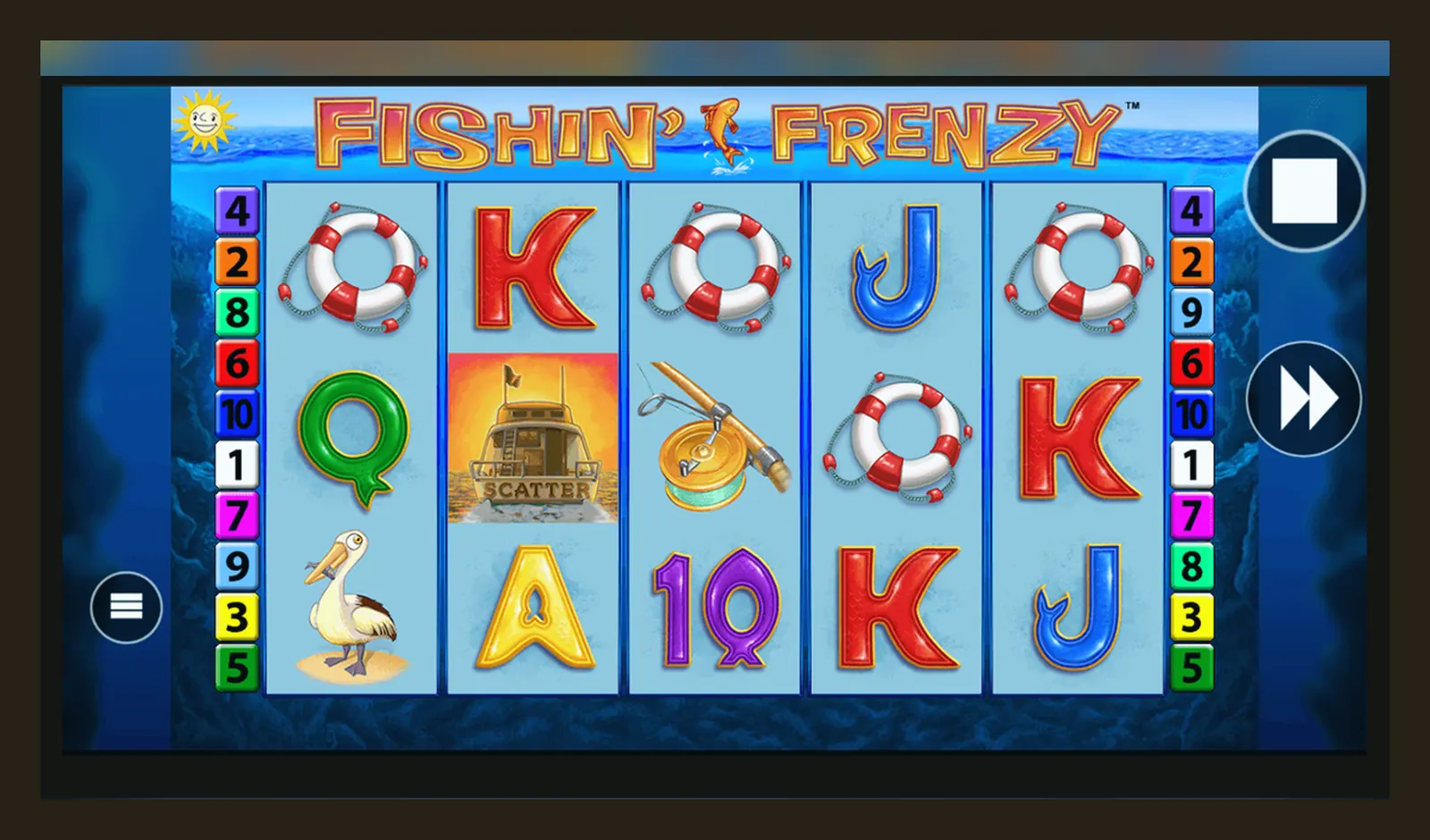
Here's the fact that changes everything: there is no standalone Fishin' Frenzy app in the Google Play Store or Apple App Store. The game doesn't exist as a separate download from Blueprint Gaming or any developer acting on their behalf. What you'll find instead are casino operator apps—licensed by the UK Gambling Commission—that host Fishin' Frenzy alongside hundreds of other slots.
This matters because searches for «Fishin' Frenzy app» or «Fishin' Frenzy APK» often lead to unlicensed sites, fake clones, or worse. This page walks through what's real, what's risky, and how to play the actual game on your phone without stumbling into trouble.
What You'd See if a Real App Existed
To understand what's missing, picture the store listing that would appear if Blueprint Gaming had released a standalone app. Here's the card you won't find:
That listing doesn't exist because Fishin' Frenzy is distributed exclusively through casino operators who hold UKGC remote licences. Each operator builds its own app, and the game runs inside it. The advantage: you're playing under a regulated framework with GAMSTOP integration, stake caps of £5 per spin (£2 for 18–24s), and affordability checks starting from £150 net deposits a month. The downside: you can't just grab the game and play for free without creating an account and passing age verification first.
Four Ways to Get Fishin' Frenzy on Your Phone
Since there's no standalone app, here are the real paths—and the trade-offs:
- Browser play: Open Safari or Chrome, visit a UKGC-licensed site (check the register and match the licence number in the footer), log in, and launch the game. It runs in HTML5, no install needed. Downside: you'll type the URL every time, and some operators gate demo play behind login.
- Add to home screen: On iOS, tap Share → Add to Home Screen; on Android, tap the three-dot menu → Add to home screen. This creates a shortcut that opens the site in a browser frame. It looks like an app icon but doesn't install anything. Downside: still a webpage, so you need a connection and it won't appear in your app drawer with a proper icon.
- Operator app from the store: Download the casino's official app (e.g., Sky Vegas, Paddy Power Games, Grosvenor, 888casino) from Google Play or the App Store. These apps bundle Fishin' Frenzy with their full catalogue. Check the developer name matches the operator and read the reviews for mentions of payout delays or glitches. Downside: you're tied to that operator's terms, welcome offer wagering (usually 30–50× the bonus), and KYC process—documents required before the first withdrawal, which takes 24–48 hours to clear.
- APK from a third-party site: DO NOT. APKs outside the Play Store bypass Google's vetting. You have no idea what's bundled in the file—keyloggers, adware, or a reskinned fake that takes deposits and never pays out. Even if the game looks real, it won't connect to a licensed RNG or UKGC-regulated operator. You're gambling blind, and any winnings are fantasy. Unlicensed gambling sites are illegal to market in the UK, and you have zero recourse if something goes wrong.
What You'd Actually See on Screen
Whether you play in a browser or an operator app, the interface is nearly identical. Here's what five screens would show:
- Lobby: a grid of slot thumbnails, search bar at the top, filters for provider, theme, and volatility on the left. Fishin' Frenzy sits among Blueprint's other titles. Tap the icon to load the game or tap the star to demo (if your account is verified and the operator allows it).
- Game canvas: 5×3 reels, cartoon fisherman on the left, pond backdrop. Stake selector at the bottom (£0.10 to £5.00 in the UK, or £0.10 to £2.00 if you're 18–24). Spin button on the right, autoplay and info icons next to the balance display.
- Free Spins screen: when you land three scatter symbols, the game transitions to a blue underwater scene. Each fish symbol reveals a multiplier. The feature plays out automatically; you watch the total climb in the top-right corner.
- Settings overlay: tap the menu icon to adjust sound, toggle quick spin, view the paytable, or check your session history. The paytable breaks down symbol values (fisherman wild pays 200× at max stake, scatter triggers the feature) and shows RTP—96.12% if the operator hasn't selected a lower configuration.
- Balance and limits: your balance updates in real time. Deposit limits (daily, weekly, monthly) are set in account settings. If you hit the limit, the game locks deposits until the period resets. Affordability checks start from £150 net deposits a month, pulling credit-reference data at the first stage; you'll see a prompt to verify income if you cross the threshold.
None of these screens exist in a fake app. Clones show static graphics, fake balances, or crash when you try to deposit. Licensed apps connect to the operator's backend, log every spin in your history, and enforce stake caps in the code.
Phone Requirements and What the App Actually Does
Minimum specs for smooth play: iOS 13.0 or later on iPhone 7 and up; Android 7.0 (Nougat) or later with at least 2 GB RAM and a dual-core 1.5 GHz processor. Older devices can run the game but may stutter during free spins animations.
The operator app handles account management—sign-up, login, deposits via debit card (Visa/Mastercard), PayPal, Apple Pay, Open Banking, or paysafecard. Credit cards have been banned for gambling since 2020, so that option won't appear. Withdrawals go to the same method you deposited with: e-wallets clear in a few hours to 24 hours, Faster Payments to your bank in the same day to two working days, debit card returns take one to three working days. The first withdrawal is slower because the operator runs KYC—proof of identity (passport or driving licence) and address (utility bill or bank statement). Documents are reviewed within 24–48 hours.
The app also enforces responsible gambling tools: deposit limits, loss limits, session reminders, and links to GAMSTOP (the UK self-exclusion scheme that blocks every UKGC-licensed site for six months to five years). Fishin' Frenzy itself doesn't access your contacts, location beyond the initial geo-check, or any data outside the game session. All gameplay is logged server-side for dispute resolution.
Version Notes: What Changed in the Latest Build
Blueprint Gaming doesn't issue standalone app updates for Fishin' Frenzy because the game lives on the operator's platform. Instead, updates roll out server-side. The most recent changes, deployed in January 2026 across UK operators:
- Improved load times on 4G connections—game canvas now renders in under three seconds on a mid-range Android device.
- Bug fix: free spins multiplier display occasionally froze on iOS 17.2; this has been resolved.
- Adjusted reel-strip weighting to maintain 96.12% RTP after the Remote Gaming Dispensation increase to 40% in April 2026. Players see no difference in volatility or hit frequency, but the operator's margin tightened.
- Enhanced responsible gambling prompts: if you've been playing for 60 minutes straight, a pop-up now suggests a break and shows your session spend. This is a UKGC safer gambling measure, not a Blueprint feature, but it's baked into every licensed slot now.
These changes apply whether you play in a browser, via home-screen shortcut, or in an operator app. You don't download patches yourself—the operator pushes them silently.
Spotting Fakes and Dodgy Permissions
Unlicensed clones thrive on app-download searches. Here's how to recognise a fake and which permissions are a warning:
| Red Flag | Why It Matters |
|---|---|
| Developer name doesn't match the operator | Blueprint Gaming doesn't publish apps. If the developer is «Fishing Frenzy Ltd» or «BigCatch Apps,» it's fake. |
| APK hosted on a forum or file-sharing site | Legitimate apps live in the Play Store or App Store. Side-loaded APKs bypass vetting and can contain malware. |
| Requests access to contacts, SMS, or phone | Gambling apps need location (geo-check) and camera (KYC documents). Contacts and SMS access = data harvesting. |
| Promises guaranteed wins or «hacks» | RNG is server-side and certified. Any app claiming to manipulate outcomes is lying. |
| No UKGC licence number visible | Every UK-facing site and app must display the licence number in the footer or settings. Missing = illegal. |
If you've already installed a suspicious app, delete it immediately, run a malware scan (Malwarebytes or Google Play Protect), and change your passwords. Don't deposit through any platform you can't verify in the UKGC public register.
Why No Standalone App Exists (and Why That's Fine)
Blueprint Gaming's business model is B2B: they license games to operators, not end users. A standalone app would require Blueprint to obtain a UKGC remote licence, build a payment infrastructure, handle KYC, and compete with the casinos that currently pay them royalties. It doesn't make commercial sense.
For players, this setup has trade-offs. You lose the convenience of one-tap access to a single game. You gain regulatory protection: every spin is audited, your funds are held in segregated accounts, and disputes are handled by a licensed entity with a public complaints record. If an operator folds, the UKGC's framework ensures your balance is returned (within limits). A random APK offers none of that.
The cleanest path is to pick a UKGC-licensed operator with a solid app (check reviews for payout speed and support responsiveness), verify your account, and add the casino to your home screen if you want an icon. It's two extra steps compared to a standalone app, but it's the only way to play Fishin' Frenzy legally in the UK.
FAQ
Can I download Fishin' Frenzy from the Play Store or App Store?
No standalone Fishin' Frenzy app exists in either store. The game is available inside casino operator apps (Sky Vegas, 888, Grosvenor, etc.) or via mobile browser on UKGC-licensed sites. Download the operator's official app, verify your account, and launch the game from their lobby.
Is it safe to install a Fishin' Frenzy APK from a third-party site?
No. APKs outside the Play Store bypass Google's vetting and often contain malware or connect to unlicensed casinos. You have no regulatory protection, no verified RNG, and no recourse if the app steals your deposit. Stick to UKGC-licensed operators whose apps are in official stores.
Why does the game ask for camera and location permissions?
Location confirms you're playing from the UK (required by the UKGC). Camera is used to upload KYC documents—passport, driving licence, or utility bill—before your first withdrawal. Requests for contacts, SMS, or phone calls are red flags; legitimate gambling apps don't need those.
Do I need to create an account and verify my age to play Fishin' Frenzy on mobile?
Yes. UK regulations require age and identity checks before you can deposit, and many operators gate demo play behind login as well. You'll provide proof of identity and address before the first withdrawal—documents are reviewed in 24–48 hours. This applies to every UKGC-licensed site and app.